
Anyone who has deployed an embedded Linux system knows the visual silence at startup: power is on, software is progressing, yet the display still looks dead.
A few seconds later the panel may wake up, show a temporary splash screen, flicker during initialization, and only then reveal the real application. Even on fast systems, that sequence feels fragile because the problem is usually not compute performance. It is display ownership during boot.
In user-facing products such as industrial HMIs, medical devices, and mobility platforms, that behavior translates into uncertainty, inconsistent startup perception, and lower perceived product quality.
GraphLab Boot approaches the problem differently. The real-time core activates the display immediately at power-on, keeps the pipeline alive while Linux boots, and lets Linux render into that already active path without a visible reset.
This article explains how that works on a Toradex Verdin iMX8M Plus running Torizon, why the display stays continuous, and what that changes for system designers.
Video Demonstration
What causes the black screen during boot?
The root cause is simple: in a conventional embedded Linux boot flow, no single component owns the display from start to finish.
A bootloader may bring up the panel, the kernel may later reconfigure hardware, the DRM subsystem initializes graphics, and finally the userspace compositor becomes the active renderer. Every transition can reinitialize timing, modes, or output paths.
Even when each individual stage behaves correctly, the transitions between them can still introduce black frames, flicker, or timing-dependent behavior. From an engineering perspective that is expected. From a product perspective it is undesirable.
How does GraphLab Boot show the first pixel immediately?
GraphLab Boot removes the initial gap between power-on and visible output by initializing the display pipeline immediately and showing a first frame before Linux is ready.
In the default GraphLab Boot setup, that first frame can be a splash screen with configurable status text that is not static. The displayed messages can correspond to real system states such as display-pipeline initialization, handover readiness, or Linux DRM milestones while still being customized per project.
In practice, this behaves like a configurable state-to-message mapping: a given boot or display state can trigger a specific status text on screen. That already gives the user meaningful live feedback while the Linux side is still booting.
Where the project needs more than a splash screen, GraphLab can extend the RealTime Core rendering into a richer early UI with animations, text, images, primitives, and live data from peripherals such as I2C, SPI, or CAN. This should be presented as a GraphLab-delivered project extension, not as a self-serve customer workflow today.
The result is a deterministic starting point: the system appears alive from the first moment, the user gets immediate visual feedback, and the boot experience no longer begins with a black screen.
How does the display stay continuous until Linux is ready?
The second challenge is the transition to Linux graphics. In a conventional setup, Linux takes control of the display pipeline, reinitializes DRM state, and risks visible blanking while ownership changes.
GraphLab Boot avoids that handover model altogether. The real-time core remains the persistent owner of the display pipeline, while Linux joins the already running system instead of tearing it down and rebuilding it.
In a Torizon environment, the Linux graphics stack, compositor, and UI container can still start in the background while user-visible output remains under RealTime Core control. The switch to Linux-rendered output happens only at the selected handover point, so the user does not need to see intermediate Linux startup stages on screen.
How does the Linux UI become interactive without a visible switch?
Continuous output does not mean the same early frame is shown forever. Once the Linux userspace and the application container are fully initialized, rendering switches from early boot content to the real application output.
That switch can happen automatically through continuous frame detection, or it can be triggered explicitly through a sysfs switch when the application decides the Linux output is ready to take over.
The control is reversible as well. If the Linux application needs maintenance, restart, or recovery, rendering can switch back to the RealTime Core without forcing the user through a visible sequence of intermediate Linux startup states. In a project-specific implementation, GraphLab can define what is shown in that fallback state, for example, update progress, status information, or other designed content. This also creates a useful safety layer: if Linux or the application crashes, the RealTime Core can automatically take over again and continue rendering defined service-relevant or safety-critical content.
From the user's perspective, the system boots directly into the ready state of the application. Because the underlying display pipeline stays active throughout, the handover can happen without a visible reset, blank frame, or mode change.
How does the architecture work without a handover?
This approach uses the heterogeneous multi-core design of the i.MX family. GraphLab Core on the Cortex-M7 initializes and protects the display pipeline while Linux boots on the application cores.
In plain language, Linux does not stream every display update through the Cortex-M core as a bottleneck. Instead, the Cortex-M keeps the display engine alive and owned, while Linux renders into shared framebuffers that are already connected to that active pipeline.
The Resource Domain Controller (RDC) keeps the relevant display registers under M7 control so Linux initialization cannot accidentally disturb the live output path.
A custom DRM driver then exposes the existing pipeline to Linux without transferring ownership. Linux can render through the familiar Linux graphics path, but it does so on top of a display pipeline that never had to be handed over.
Boot Flow Overview
The diagram below summarizes that sequence: the real-time side brings the display up early and keeps it stable, while Linux joins later as a renderer rather than as a new display owner.
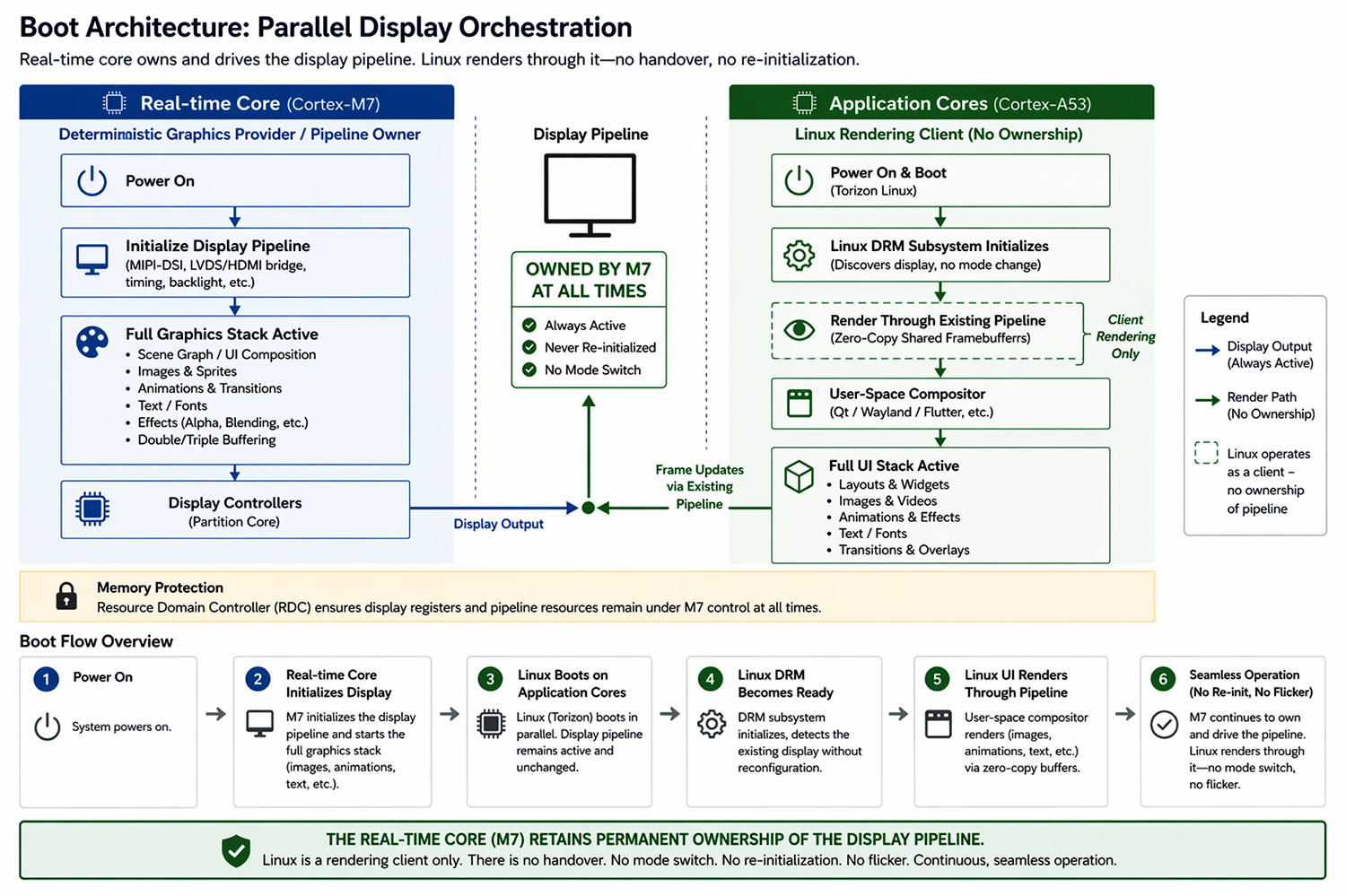
The zero-copy shared-framebuffer model is important here. It avoids extra blit or composition stages just to cross the boot boundary and helps explain why the transition can stay visually seamless.
What changes in practice on Toradex Verdin iMX8M Plus?
The current validation setup uses a Toradex Verdin iMX8M Plus on a standard carrier board with an LVDS display, a Torizon OS reference image, the standard Linux graphics stack, and GraphLab Boot integrated into early boot.
Linux still runs on the application cores with a dedicated DRM driver, while GraphLab Boot operates alongside the standard boot flow to preserve continuous display output.
Results on Real Hardware
The sequence below shows the same hardware during startup: GraphLab Boot provides visible, controlled output from the earliest display bring-up stage, while the standard Linux path still passes through intermediate blank or transitional states before the application is ready.
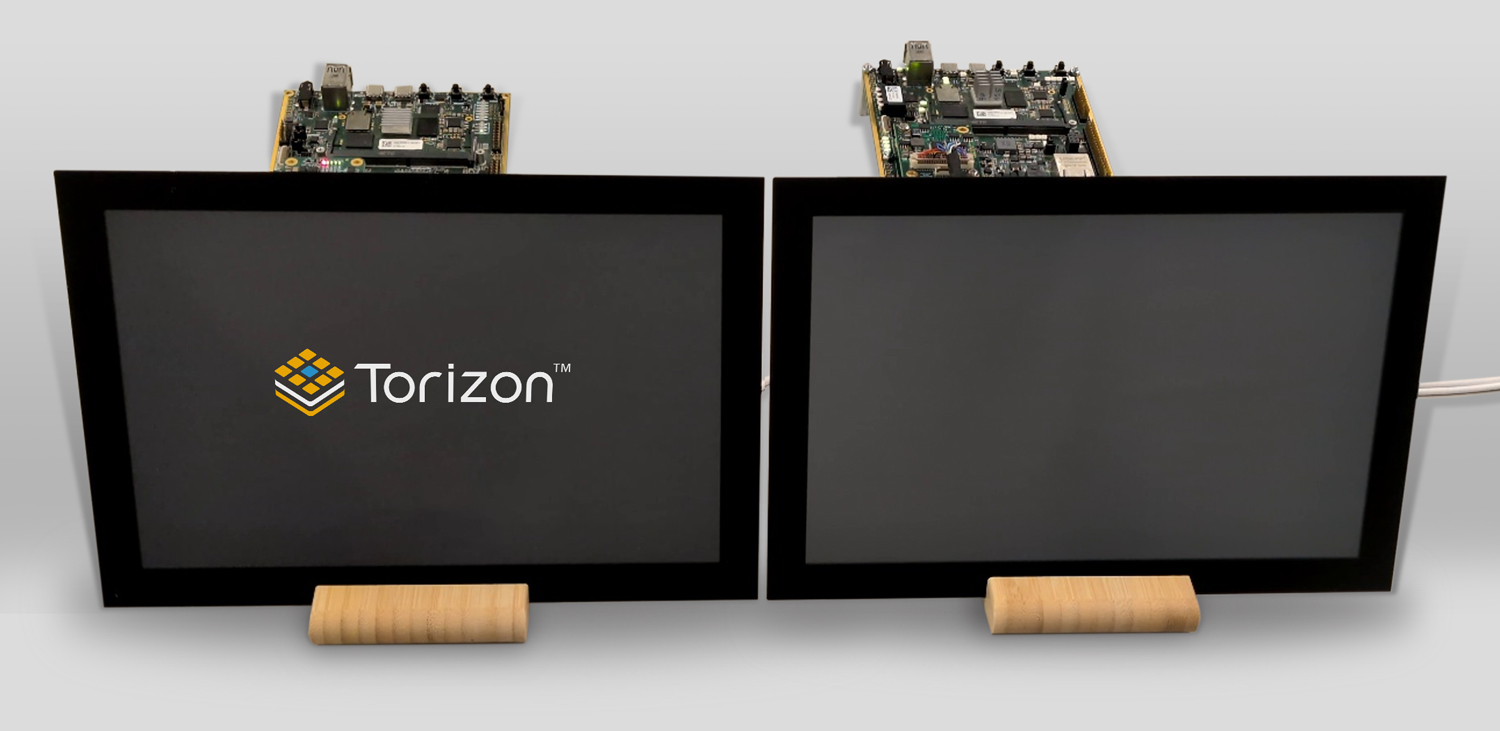
Early boot: GraphLab Boot visible output vs. standard Linux black screen
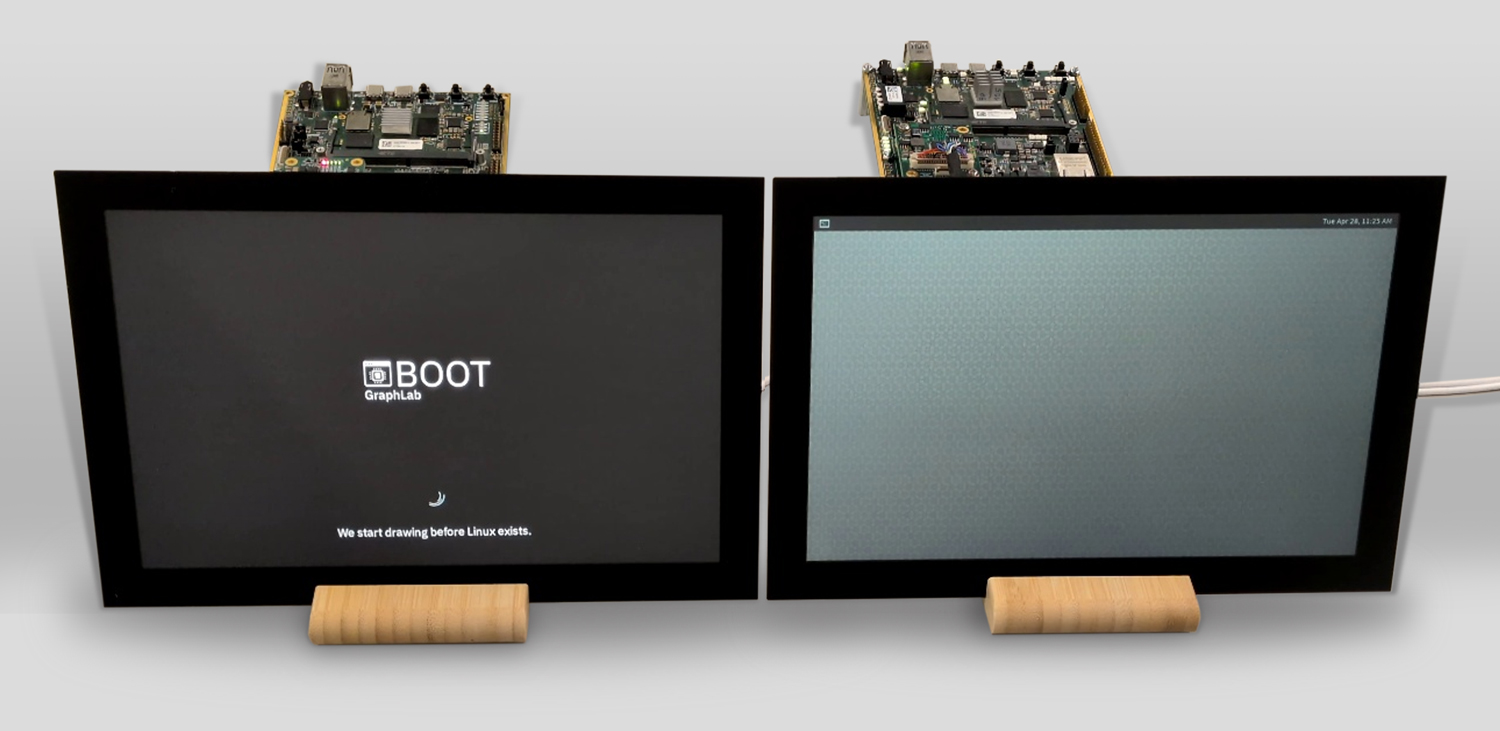
Mid-boot: GraphLab Boot keeps a controlled progress display active, while the standard Linux path exposes an intermediate compositor screen before the real application is ready.
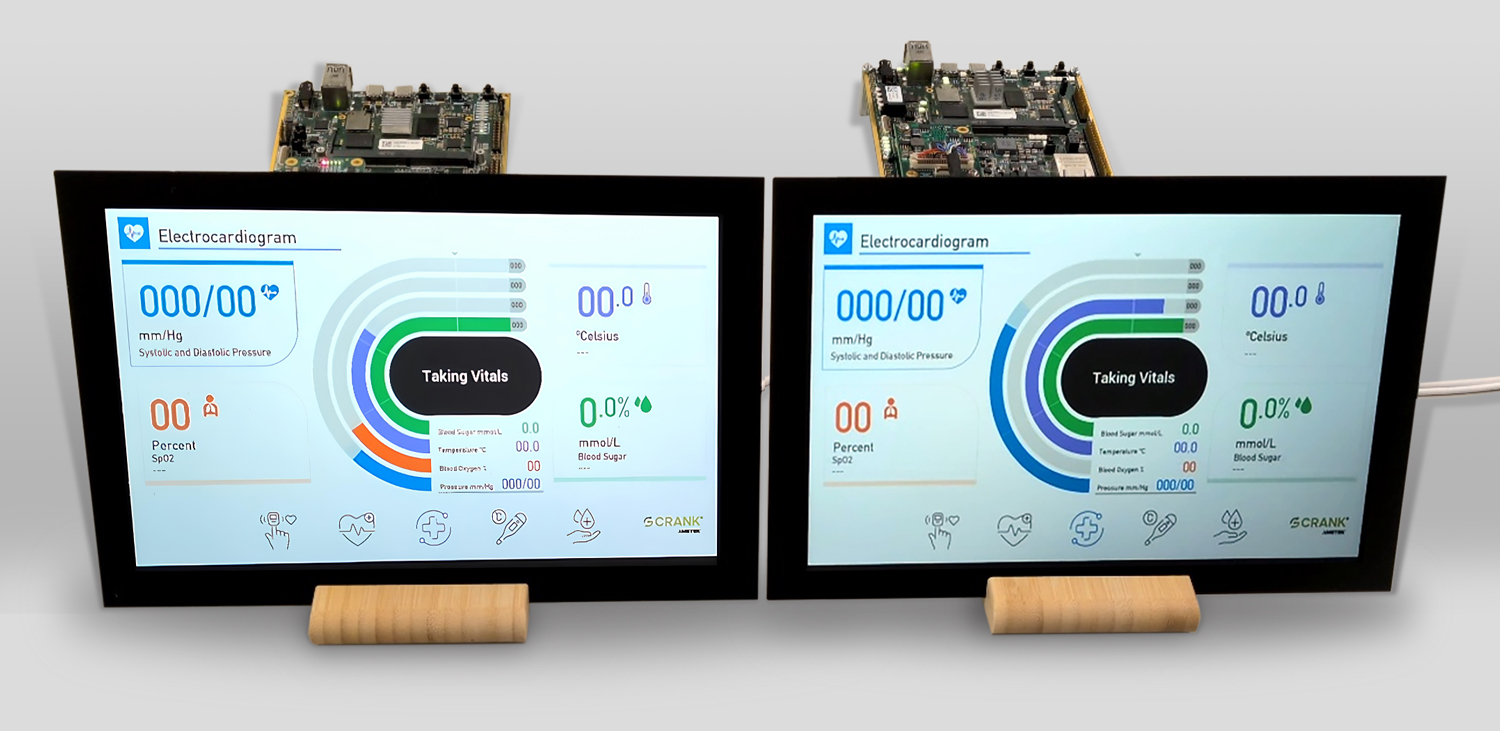
Application ready: both systems reach the UI, but only GraphLab Boot stays visually continuous throughout
The side-by-side comparison shows the practical difference clearly: the standard Linux path passes through visible blank or transitional states before the application is ready, while the GraphLab Boot path keeps display output continuously active until the selected handover point.
In the current setup, GraphLab Boot reaches the first visible pixel in 800ms.
Time to UI ready is not inherently reduced by GraphLab Boot. The Linux boot and application startup process remain the same; the difference is that the display stays continuously active and controlled until the real UI is ready.
Standard Linux boot showed multiple visible blank or reset moments before the real UI was ready; GraphLab Boot maintained continuous output with no user-visible display reset.
The key improvement is not only that the screen turns on earlier, but that the user never sees the internal startup choreography of bootloader, DRM, compositor, and application initialization.
What does compatibility look like in practice?
A key benefit of this approach is that Linux-side application development stays familiar. GraphLab Boot changes how the display pipeline is initialized, protected, and exposed during boot; it does not require the Linux graphics stack to be fundamentally rewritten.
For the reader, that means existing Linux graphics frameworks and hardware-accelerated rendering paths can remain in place while GraphLab Boot removes the visible startup artifacts underneath them.
This is already validated with Torizon Demo Gallery images such as Qt, Embedded Wizard, and Crank Storyboard. Those examples show that existing application frameworks can stay in place while GraphLab Boot improves the boot-to-UI experience underneath them.
Integration is still deliberate rather than magic. In this example, it centers on an SPL hook for early loading of the RealTime Core firmware, the required device tree additions, the dedicated DRM driver, and the switch-control model. Even so, Linux updates, BSP maintenance, and existing workflows remain much more straightforward than in a design that rewires the whole graphics stack.
Where does this matter most?
Industrial HMIs benefit from immediate operator feedback and a startup sequence that looks deterministic rather than glitchy. Medical devices benefit from a more controlled and traceable path from power-on to usable UI.
Mobility and transport systems benefit from a display that appears stable from the first moment instead of resetting through multiple visual states. Platform engineering teams benefit because the improvement comes from using heterogeneous SoC capabilities more deliberately, not from forcing every application team to redesign its Linux UI stack.
How can I evaluate this solution?
A practical evaluation on Toradex Verdin iMX8M Plus starts with the GraphLab base OS image and the Toradex Demo Gallery projects running on top of it.
That setup makes it easy to observe the effect from the first display initialization all the way through to the smooth start of the real application. The comparison is especially clear when you run familiar Demo Gallery projects on the same hardware and see the difference between the standard boot path and the GraphLab Boot experience.
To explore GraphLab Boot, visit https://graphlab.net/. To try the demo, first create your GraphLab Portal workspace and follow the onboarding and technical documentation at https://portal.graphlab.net/. If you want commercial guidance, use the Request Sales Information path on graphlab.net. If you need hardware-oriented evaluation, use the Request Evaluation Kit path, which leads into the Toradex evaluation flow.
Conclusion
Embedded Linux systems do not have to accept flicker and black screens as a normal part of boot. Those artifacts are usually a consequence of fragmented display ownership, not an unavoidable limitation of Linux itself.
GraphLab Boot shows that the first pixel can appear at power-on, the display can remain continuously active while Linux initializes, and the real application can become visible without a disruptive display handover.
For teams building user-facing embedded products, that means a more deterministic startup experience without sacrificing the familiar Linux rendering environment on the application side.
Today, the proof point is Toradex Verdin iMX8M Plus. The same architectural approach is not inherently limited to that module and is also applicable to additional Toradex platforms based on i.MX 91, i.MX 93, or i.MX 95, with platform-specific realization taken up in the context of a customer project.

